
Game Dev AI
Key Points
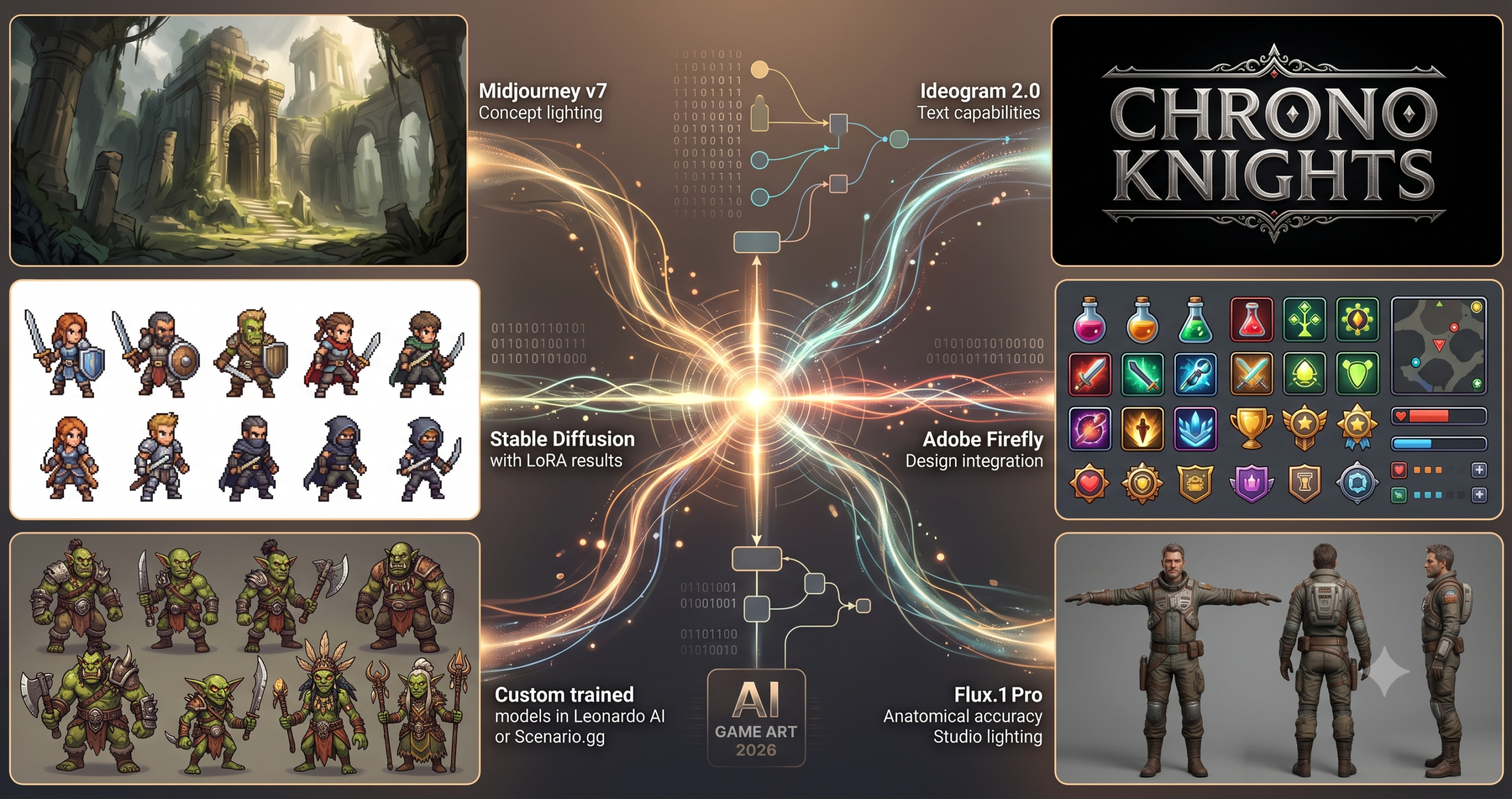
- Leonardo AI ranks first because it was purpose built for game developers, including custom model training on your own style.
- Midjourney v7 still leads on raw concept art and environment quality, but character consistency across frames lags behind purpose built tools.
- Stable Diffusion through ComfyUI gives the deepest control and the lowest per image cost, at the price of real setup time.
- Ideogram 2.0 is the only tool here that reliably renders readable text, which makes it the right choice for logos and HUD design.
- Kling AI extends the pipeline into short animated clips, useful for trailers and cutscene reference rather than final in engine animation.
- Character consistency, hand anatomy, and weapon geometry remain the most persistent failure points across every tool tested.
That specific frustration, knowing AI art can work for games but not knowing which tool to use or how to coax it into producing what you actually need, is what this guide is built around. Not a general “AI image generators ranked by hype” list. A working developer’s breakdown of which tools produce game ready assets, which ones are best for certain game styles, and exactly what kind of prompts get results.
The tools in this list were evaluated for real game development workflows. Tileset consistency, character sprite usability, concept art fidelity, UI element generation, and how well each tool handles the iterative nature of game art production all mattered. Some of them surprised us. A few of the most hyped ones turned out to be nearly useless for actual game pipelines without significant post processing work.
By the end of this guide, you will know which AI art generator to reach for depending on whether you are making a dark fantasy RPG, a pixel art platformer, a mobile casual game, or an indie horror title, and you will have working prompts to get started immediately.
Why AI Art Generation Is Different for Game Development
The problem most people run into when they first use AI art tools for games is treating them like a one shot machine. Type a description, download the image, drop it into the engine. That works beautifully for portfolio mockups and social posts. It barely works for actual game production, where you need consistency across dozens of characters, readable silhouettes at small sizes, transparent backgrounds, and assets that tile seamlessly.
Game art has specific technical requirements that AI tools facing consumers were not originally designed to satisfy. A stunning Midjourney image of a warrior character is often completely unusable as a game sprite because the lighting is baked in, the background is inseparable from the foreground, and the style shifts slightly every time you generate a new pose. That said, the tools that have emerged specifically for game development, and the workflows that experienced developers have built around the more general tools, have made real progress. In 2026, you can genuinely ship a game with AI assisted art if you choose the right tool and understand what each one is actually good at.
General purpose tools like Midjourney and DALL-E 3 excel at concept art, mood boards, and one off illustrations. Purpose built tools like Leonardo AI and Scenario.gg were designed from the ground up for consistency, asset training, and game pipelines. Open source options like Stable Diffusion give you the deepest control, including LoRA training on your own style, but at the cost of setup time and technical overhead. None of them are magic. All of them are significantly more useful once you understand their actual strengths.
The single biggest mistake game developers make with AI art tools is using a general purpose image generator for production assets without accounting for consistency, transparency, or style drift between generations. Match the tool to the asset type, and read what each tool is genuinely bad at before you commit to it for a project.
Before You Start, How to Choose the Right Tool for Your Game
Before you install anything or sign up for a trial, spend five minutes answering three questions about your project. What is your game’s visual style? How much style consistency do you need across assets? And what is your technical pipeline, do you have someone who can do cleanup in Photoshop or Aseprite, or do you need assets that are close to ready out of the box?
A pixel art roguelike has completely different requirements from a hand painted 2D platformer or a 3D mobile game needing texture maps. The tools that shine for painterly concept art often fail for pixel work. Tools with great character generation frequently produce unusable tilesets. The model version matters too. Most of the platforms below have updated their core models significantly in early 2026, and prompt techniques that worked a year ago may need adjustment. Whenever a tool below mentions a specific model version, that is the version tested for this guide.
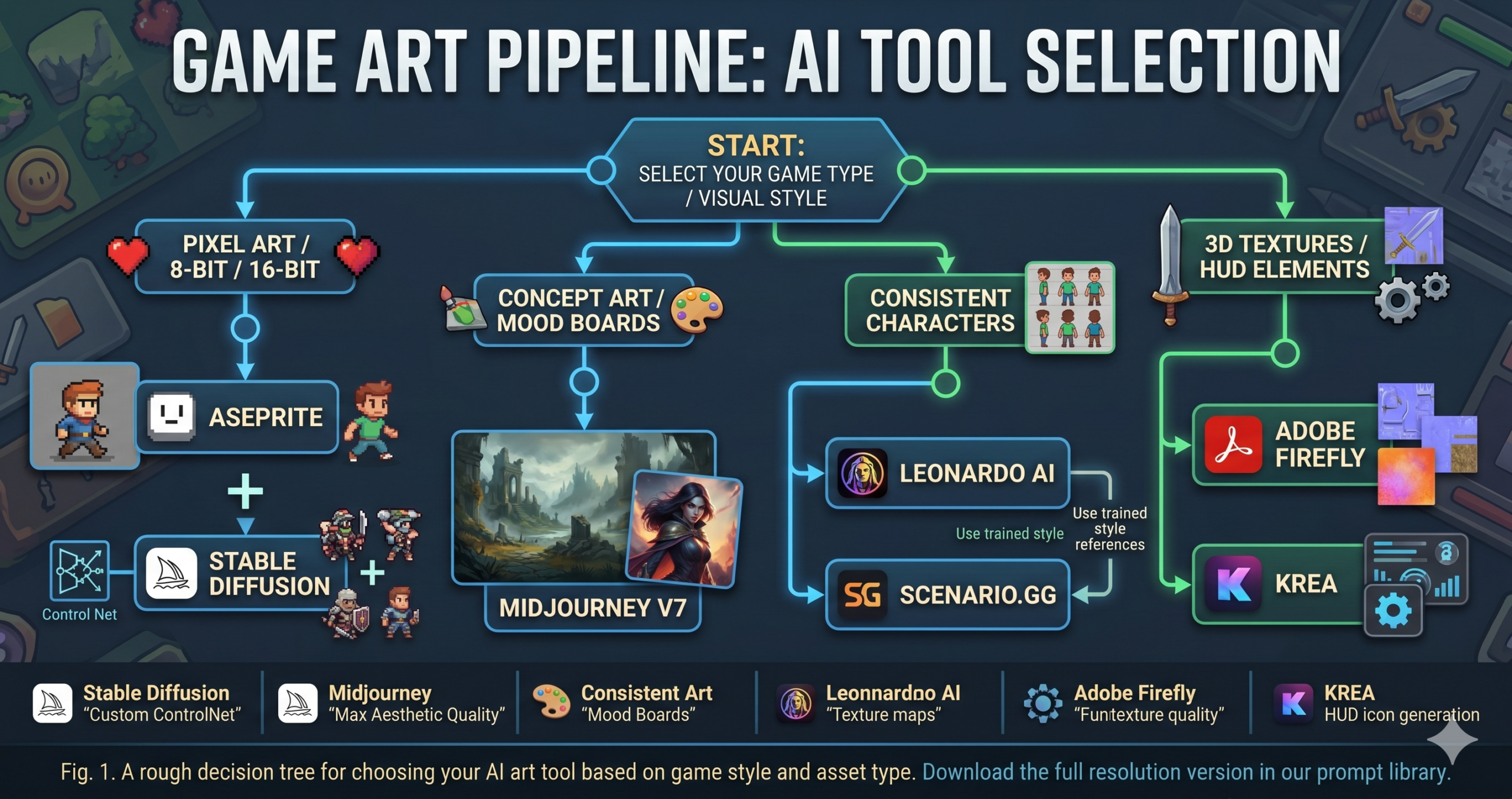
One practical thing worth knowing before you start. Every tool on this list works dramatically better with structured prompts. Not longer, structured. You will get much more consistent results specifying art style, medium, lighting, camera angle, and color palette in separate clauses rather than writing a single run on sentence description. The prompts later in this guide demonstrate exactly what that looks like for each tool.
Do not commit a tool to your production pipeline based on one or two test images. Generate at least 10 to 15 assets in the style you need and check for consistency drift, silhouette clarity at target resolution, and how well the tool handles variations of the same character or environment. That is the real test.
The Best AI Art Generators for Game Development in 2026
1 Leonardo AI, Best Purpose Built Tool for Game Developers
Leonardo AI is the closest thing the game development world has to a production tool built specifically for it, and it shows in almost every feature decision the team has made. The platform launched with game developers explicitly in mind, and its core differentiator is the ability to train custom models on your own art style, meaning once you establish a visual language for your game, you can generate new assets that are genuinely consistent with that style rather than hoping the base model drifts in the right direction.
The AI Canvas feature lets you do inpainting and outpainting directly in the browser, which is useful for extending tilesets or fixing problem areas without leaving the platform. The Image Guidance system, which lets you feed a reference image and control how closely the output follows it, is one of the better implementations of this feature across any tool tested for this guide. Character consistency across multiple generations is measurably better here than on general purpose tools.
Why it works: The explicit “clean white background” and “isolated character” instructions reduce Leonardo’s tendency to add environmental context. The style descriptor before the color palette gives the model a visual grammar to work from before it decides on hues. Reversing this order tends to produce muddier results.
How to adapt it: For an enemy sheet, replace the single character description with “enemy type A, B, and C variations, same art style, same lighting angle.” Leonardo handles multi subject consistency better than most tools when you specify style continuity explicitly.
2 Midjourney v7, Best for Concept Art and World Building Visuals
Here is where it gets interesting. Midjourney v7 is not the most practical game production tool on this list, but it may be the most genuinely inspiring. For concept art, mood boards, environment illustrations, and pre production visual development, it produces images with a quality ceiling that still exceeds most competitors. When a game director needs to show a publisher what the world of their game feels like, Midjourney is usually the right call.
The v7 release improved character consistency significantly with the –cref character reference flag, which locks certain visual attributes of a character across multiple generations. It is not perfect, expect 15 to 20 percent variance across a set, but it is a genuine improvement over treating each generation as a coin flip. For environment art and key illustrations, it remains the benchmark most other tools are measured against.
Why it works: The “readable foreground and background layers” instruction is doing real work here. It primes Midjourney to separate depth planes rather than creating a visually flat image. Game art directors need to be able to identify where player characters will move relative to scenery, and this prompt structure encourages that separation.
How to adapt it: Add the cref parameter with a reference character image URL to place a specific character silhouette into the environment, then use inpainting in the Midjourney editor to clean up inconsistencies.
3 Stable Diffusion via ComfyUI, Best for Full Control and Local Generation
None of this comes free. Stable Diffusion with ComfyUI gives you the most control of any tool on this list, but it also demands the most from you technically. If you have a capable GPU, RTX 3080 or better, a tolerance for node graphs that feel YAML adjacent, and the patience to train your own LoRA models, this is the only tool that will let you generate assets that look exactly like your existing art style at no per image cost. Our Stable Diffusion for game development guide covers the full setup.
The game development community has built a rich ecosystem of LoRA models, ControlNet presets, and ComfyUI workflows specifically for game asset production. Pixel art LoRAs for 8 bit and 16 bit styles, sprite sheet workflows that generate consistent character frames, and tileset generation pipelines with seamless edge matching all exist and work well. The barrier is setup and iteration time, not output quality.
Why it works: The negative prompt is doing as much work as the positive one here. Stable Diffusion without a strong negative prompt will drift toward photorealism by default because that is what most of its training data looks like. “No anti-aliasing” and “clean edges” are the two instructions most pixel art workflows forget. They are the difference between something usable and something that looks like a pixelated photograph.
How to adapt it: Swap the LoRA for a hand painted or comic book LoRA and adjust the style descriptors. The negative prompt structure stays the same regardless of target style. Always explicitly exclude the default model behaviors you are trying to escape.
4 Adobe Firefly, Best for Teams Inside the Adobe Ecosystem
Think about what this actually requires. A tool that generates an asset, then lets a senior artist refine it in the same application, export it directly to a format compatible with a game engine, and do all of that without switching between four different apps. That is what Adobe Firefly offers if your studio is already inside the Creative Cloud ecosystem. The generation quality is not the best on this list, but the integration is unmatched.
Firefly’s generative fill and generative expand features inside Photoshop are genuinely useful for game art post processing, extending a partially generated environment, removing a background from a character, or filling in a portion of a texture map that a different tool could not complete. Illustrator’s vector generation features are useful for UI elements and icons. The training data that is safe for intellectual property is a real differentiator for studios that need commercial licensing certainty.
Why it works: Firefly’s training leans toward commercial design aesthetics, which makes it better at UI elements and iconography than at painterly illustrations. “Consistent visual weight” is an instruction specific to Firefly that taps into its design training and tends to produce icons that feel like they belong in the same set, a common problem when generating UI assets in batches.
How to adapt it: Generate individual icons with Firefly, then use the Generative Fill in Photoshop to adjust any that do not match your existing set. This hybrid workflow is faster than regenerating the entire set until it is perfect.
5 Scenario.gg, Best for Consistent In Game Assets at Scale
Scenario.gg was built for exactly the use case that breaks most AI art tools, generating large numbers of assets that all look like they came from the same artist. It lets you train a private model on your own art. Upload 10 to 20 reference images, run a training job, and generate new assets in that exact style on demand. For mobile game studios that need to ship hundreds of cards, characters, or environments without hiring a full art team, this workflow is genuinely practical. Our Scenario.gg custom model training guide walks through the full setup.
The platform’s composition tools let you layer backgrounds, characters, and props separately, useful for generating variants of the same scene without regenerating everything from scratch. It is not as impressive as Midjourney for single image quality, but consistency at scale is a different problem, and Scenario solves it better than anything else at this price point.
Why it works: The custom trained model reference is the critical component. Without it, you are using a generic base model and losing Scenario’s main advantage. Training a model on even 15 to 20 pieces of your existing art transforms output consistency dramatically. This is the step most users skip because it requires an upfront time investment.
How to adapt it: For environment assets rather than characters, replace the pose and class variables with “isometric tile, seamless edge, environmental prop type, rocks, trees, ruins, or water” and use Scenario’s batch generation to produce a full tileset in one session.
6 DALL-E 3 via ChatGPT, Best for Rapid Ideation and Iteration
Most tutorials skip this part entirely, the fact that DALL-E 3’s biggest advantage for game developers is not the image quality, but the conversational iteration. Because it is embedded in ChatGPT, you can describe what you want, see a result, say “make the character shorter and give them a glowing blue sword instead of red,” and actually get a meaningfully updated image. Other tools require you to re-engineer the entire prompt to change one detail. ChatGPT lets you iterate like you are talking to a junior artist.
The tradeoff is consistency and control. DALL-E 3 interprets your prompts creatively, which means surprising results in both directions. For early concept stages where you want to explore different directions quickly, art style options, character silhouettes, and color palette experiments, it is excellent. For production assets that need to match an established style, it is the wrong tool.
Why it works: The “front and 3/4 view side by side” instruction is a DALL-E 3 trick for getting character reference sheets. The model handles multi view character sheets reasonably well when you request them explicitly rather than generating separate images. The “do not add any text” instruction prevents the model’s habit of adding label annotations to concept sketches.
How to adapt it: After the initial generation, follow up in ChatGPT with specific changes such as “make the armor heavier and more worn, change the color to teal and black, and add a weapon on their back.” You can iterate 5 to 6 times in a single conversation and land on something genuinely useful without rewriting the whole prompt.
7 Flux.1 via ComfyUI or Fal.ai, Best for Photorealistic Game Characters
Black Forest Labs’ Flux.1 model quietly became the new benchmark for photorealistic human characters in late 2025, and it has maintained that position in 2026. If your game targets the realistic end of the visual spectrum, a survival game, a modern military shooter, or a cinematic RPG, Flux produces character reference art and costume design images that are noticeably more anatomically accurate and physically plausible than Midjourney or DALL-E 3.
The difference between a mediocre prompt and a great one in Flux is often lighting description. Flux responds especially well to specific cinematography language, “key light from upper left, rim light from behind, fill light soft and diffuse,” in a way that other models treat as decoration. This makes it particularly useful for generating character sheets with consistent lighting that can later be used as references for 3D artists.
Why it works: The T pose instruction is specific to 3D pipeline workflows. If a 3D artist needs to use this as a reference for modeling, a neutral pose without action or foreshortening is dramatically more useful than a dynamic hero shot. Most people generating character art for games forget this entirely.
How to adapt it: For a 3D modeler’s reference pack, generate four images, front T pose, back T pose, left side profile, and 3/4 view. Use the same prompt with the view direction swapped and the seed locked. In Flux via ComfyUI, the seed parameter makes this much more reliable than in web based tools.
8 Ideogram 2.0, Best for UI Elements, Text, and HUD Design
This is not a small distinction. Ideogram 2.0 is the only mainstream AI art generator that handles text in an image reliably enough to be useful for game UI design. Every other tool on this list produces garbled, misspelled, or visually inconsistent text when you ask it to render words inside an image. Ideogram’s text rendering is not perfect, but it is in a different league, which makes it uniquely valuable for game logo design, HUD element mockups, loading screen titles, and in-game signs or books.
Beyond text, Ideogram’s flat and graphic design outputs are strong. Skill tree icons, achievement badges, minimap elements, and button designs all tend to come out cleaner and more vector friendly here than on tools optimized for painterly illustrations. For indie developers designing their own UI without a dedicated UI artist, it is underutilized and underrated.
Why it works: Wrapping the game title in quotes signals to Ideogram that this specific text should appear in the image. Without that, the model treats the title as descriptive text and may not render it. “Readable at small sizes” is a practical game UI instruction that pushes Ideogram toward bolder, heavier letterforms.
How to adapt it: For UI button labels and menu elements, generate a full set with consistent typography by keeping the same style descriptors and only changing the label text in quotes. Ideogram’s style consistency within a session is better than most tools when prompts share the same structure.
9 Krea AI, Best for Real Time Iteration and Style Exploration
Krea AI operates differently from everything else on this list. It generates images in real time as you type, giving you a live preview that updates with every word you add or change. For game art directors exploring a visual style or trying to communicate a vibe to a team, this real time feedback loop is extremely useful. You can watch the art direction evolve second by second rather than waiting 15 to 30 seconds per generation.
Krea also has an enhance mode that can upscale and stylize existing game screenshots or AI generated images, which is useful for taking a rough Stable Diffusion output and pushing it further without a full regeneration. The canvas tool lets you sketch rough shapes and have the AI interpret them in your target style, essentially a faster version of Photoshop’s generative tools for exploration purposes.
Why it works: The real time nature of Krea means the prompt itself matters less than how you use the feedback loop. Start with the broadest strokes, game world, art direction, and mood, and watch the image evolve as you add specificity. The canvas rough sketch feature is particularly useful for communicating spatial relationships that are hard to describe in words.
How to adapt it: Use Krea for art direction exploration only, then move the finalized style descriptors into Leonardo AI or Midjourney for production quality generation. The combination of Krea’s speed and another tool’s quality is more efficient than using either alone for the full pipeline.
10 Kling AI, Best for Animating Game Characters and Cutscenes
Every other tool on this list generates static images. Kling AI generates video, and for game developers who need animated cutscenes, character movement references, or promotional trailers without a full animation budget, it is a category unto itself. Kling’s image to video feature lets you take a static character image from any tool on this list and animate it with a motion prompt, producing short video clips that can serve as animation reference or, with some editing, as actual cutscene content. We cover this workflow in more depth in our guide to making a game trailer with Kling AI.
The outputs are not frame perfect animation. There is movement drift, and fine details like hands and weapons do not always survive intact. But for a pre production trailer that needs to show a character running, a dragon flying, or a sword being drawn from a scabbard, Kling produces usable material at a fraction of the cost of traditional animation. In 2026, several released indie games have used Kling generated clips as in-game cutscenes with minimal cleanup, and the results have been received well.
Why it works: “Camera stays locked” and “no background movement” are the two instructions that prevent Kling from generating cinematic camera moves that destroy the usefulness of the clip as game animation reference. “Motion strength 40 to 60 percent” is specific to Kling’s interface. Staying in this range preserves the source character’s visual identity while adding enough motion to be useful.
How to adapt it: For a game trailer, generate 8 to 10 clips of different characters and environments with this workflow, then sequence them in a video editor with music and sound design. This approach, AI art into AI animation into traditional video editing, is the most practical high quality trailer pipeline for solo developers and small studios right now.
Common Mistakes and How to Fix Them
The pattern most game developers fall into with AI art tools is not prompting badly. It is using the wrong tool for the job and blaming the output. The mistakes below are more structural than textual.
| Mistake | Wrong Approach | Right Approach |
|---|---|---|
| Using one tool for everything | Running every asset, characters, environments, UI, and logos, through Midjourney because the output looks great | Use Midjourney for key art and concepts, Leonardo AI for consistent characters, Ideogram for text and UI, Kling for animation reference |
| Skipping the negative prompt | Generating pixel art in Stable Diffusion without a negative prompt, then being confused when it looks photorealistic | Always write a negative prompt that explicitly excludes the default model behaviors, photorealism, gradients, and anti aliasing, that conflict with your target style |
| Not testing consistency at scale | Choosing a tool based on one impressive generation, then discovering 30 assets in that every character looks slightly different | Generate 15 to 20 assets in your target style before committing a tool to your pipeline. Look for style drift, not just quality |
| Ignoring background removal | Generating character sprites on complex backgrounds and spending hours manually cutting them out | Always specify “white background” or “transparent background” in the prompt and use Remove.bg or Photoshop’s AI selection for cleanup, faster than manual extraction by 10 times |
| Treating the first generation as final | Using the first output of a prompt as the production asset because it looked good at thumbnail size | Always evaluate AI art at actual game resolution. A stunning 1024px image often falls apart at 64×64px. Test in engine before approving |
“The best AI art pipeline is the one you actually iterate on. Developers who spend 10 minutes prompting and accept whatever they get are going to get whatever they get.”
Common wisdom in the indie game dev community, 2026
What These Tools Still Struggle With
Let us be direct about this. No AI art tool in 2026 can reliably produce seamless tileset sheets, pixel perfect sprite animation frames, or accurate isometric game assets without significant human cleanup or post processing. The tools have improved dramatically, but game art has requirements that general image generation was not designed to satisfy. Expecting otherwise leads to broken pipelines and frustrated teams.
Character consistency remains the most persistent limitation. Even the best tools, Leonardo AI and Scenario.gg with trained models, produce characters that drift across generations. Nose shapes shift, eye colors change, and costume proportions vary. For a card game with 200 characters who all need to feel like the same artist drew them, AI art generation is a starting point and a time saver, not a replacement for an art director reviewing every output. The drift gets worse the more complex the character. Simple silhouettes with strong color identities hold together better than characters with detailed faces and intricate costumes.
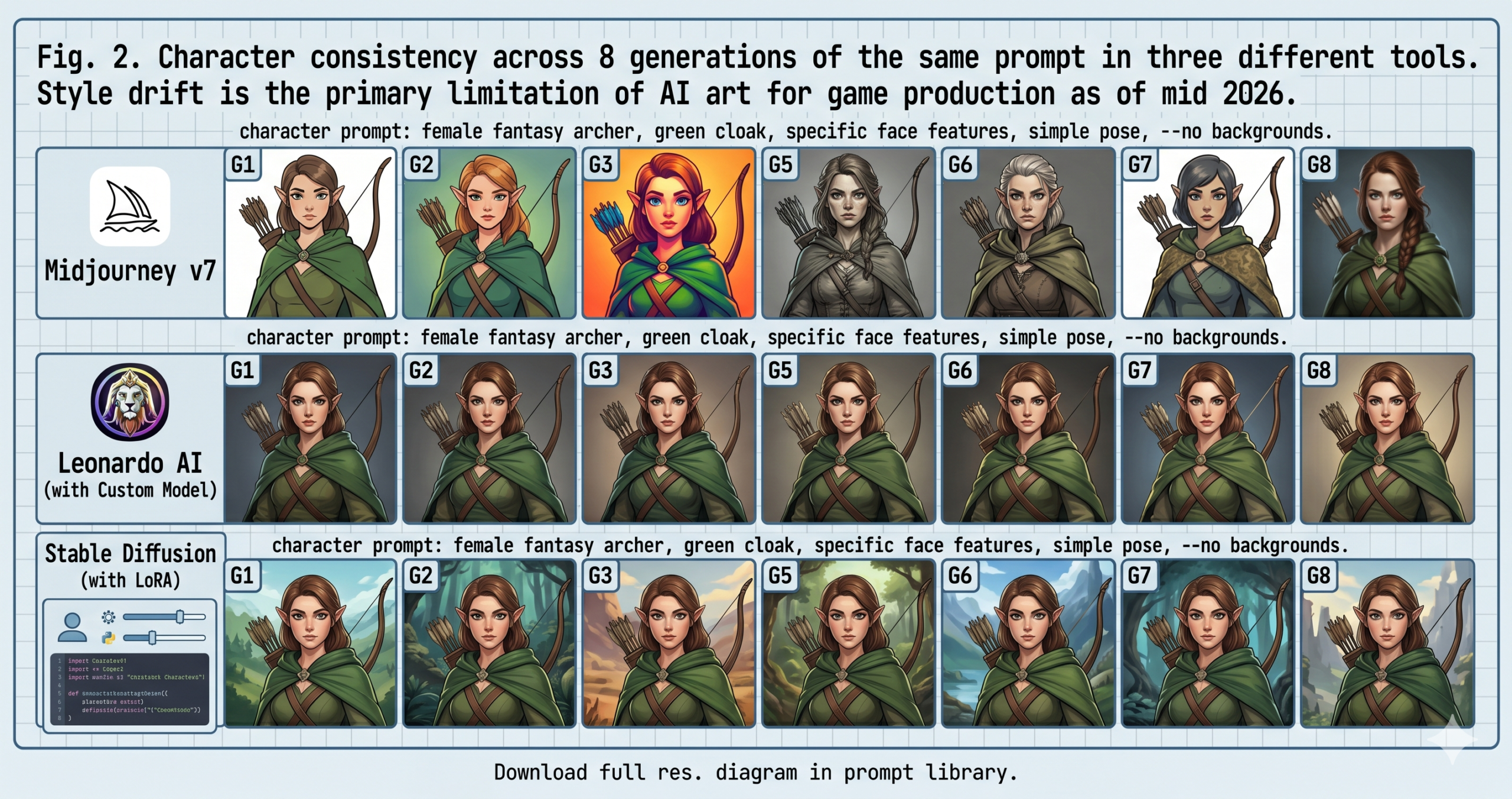
Hand and weapon rendering is still unreliable across every tool tested. Hands with correct anatomy and weapon geometry that makes physical sense are the two most common failure points, and they are also the two details players notice first when something looks off. The workaround most experienced developers use is to generate characters without detailed hands visible, use a side facing or three quarter profile, or plan for manual touch up on any asset where hands are prominent. Weapon designs often work better generated separately and composited in.
Where This Leaves You
What you have after working through this guide is not just a list of tools. It is a decision framework for matching the right generation approach to the specific asset type your game needs. Midjourney for concept art and mood. Leonardo AI or Scenario.gg for consistent characters and batch production. Stable Diffusion for full control and custom styles. Ideogram for anything with text. Kling when you need motion. Krea when you need to iterate fast and think visually. No single tool covers the entire game art pipeline, but understanding which tool handles which layer of the problem is what separates developers who ship with strong visuals from those who get stuck in generation loops.
The deeper principle here, the one that applies to every AI tool, not just image generators, is that AI works best when you have a clear mental model of what the tool is actually doing and what it tends to get wrong. Prompting well is less about writing magic words and more about understanding the model’s defaults and intentionally overriding the ones that conflict with your needs. That skill transfers. It transfers to language models, to code generation, to audio synthesis. Game development is a useful context to develop it in because the feedback loop is unambiguous. Either the asset works in engine or it does not.
That said, AI art generation in game development is not a replacement for artistic judgment. Knowing whether an asset feels right for your game, whether the visual style supports the emotional tone, and whether the player character’s silhouette will read at a distance remain human decisions. The tools reviewed here take a lot of the mechanical production time off your plate. The creative direction, the quality bar, and the final call on what ships are still yours to own.
The next 12 to 18 months will almost certainly see better video generation, improved character consistency through trained model pipelines, and native integration with game engines like Unity and Unreal that lets you generate assets directly inside your development environment. None of that changes the core workflow. Understand your tools, prompt intentionally, evaluate at game resolution, and iterate. The developers who are building those habits now will be significantly faster than those who are not when the next generation of tools lands.
Pick one tool from this list. Set a timer for two hours. Generate 20 assets for your game. That is how you actually find out which tool fits your pipeline, not by reading more comparison articles.
Frequently Asked Questions
What is the single best AI art generator for game development in 2026?
Leonardo AI is the strongest all around choice because it was built specifically for game developers, including custom model training for consistent characters and tilesets. Midjourney still wins on raw concept art quality if consistency matters less than a single piece.
Which AI tool keeps a game character consistent across many images?
Leonardo AI and Scenario.gg, when you train a custom model on your own reference art, produce the most consistent results. Even then, some drift in faces and proportions still requires human review.
Can AI generate game ready pixel art sprites directly?
Stable Diffusion with a pixel art LoRA and a strong negative prompt gets closest, but most outputs still need manual cleanup for anti aliasing artifacts and exact pixel alignment before they are truly game ready.
Which tool should I use for game logos and UI text?
Ideogram 2.0. It is the only tool in this comparison that reliably renders readable text inside an image, which makes it the right choice for title logos, HUD elements, and in-game signage.
Is it better to use one AI art tool for an entire game?
No. The strongest pipelines match each tool to a specific task, Midjourney or Leonardo for concept and characters, Ideogram for text, Stable Diffusion for pixel art and custom styles, and Kling for animation reference, rather than forcing one tool to do everything.
Why do AI generated game characters still need an art director’s review?
Hand anatomy, weapon geometry, and subtle proportion drift across generations remain unreliable in every tool tested. A human reviewing output against the established style is still required to catch the failures automated generation misses.
Try These Tools Right Now
Every tool reviewed here has a free tier or trial. Start with Leonardo AI if you are not sure. It is purpose built for game developers and the free plan is generous enough to evaluate it seriously.
Pingback: AI 2D Animation Tools Ranked 2026 — Best Options for Every Workflow - aitrendblend.com